Finds scenes in any script format
Verified on 13 real scripts in Hangul, PDF, FDX and Fountain. Even in PDFs it catches nearly every scene boundary.
PDF scene detection precision 1.00 · recall 0.94
Pre-production collaboration for film and drama crews · Free beta
Import a script and its scenes become the reference.
The breakdown, department sheets, shooting schedule and call sheet all come from those scenes. When a revision arrives, you only review the scenes that changed.
The screen is the print preview. It always ends on paper.
Log in with Kakao, Naver or email · Nothing to install
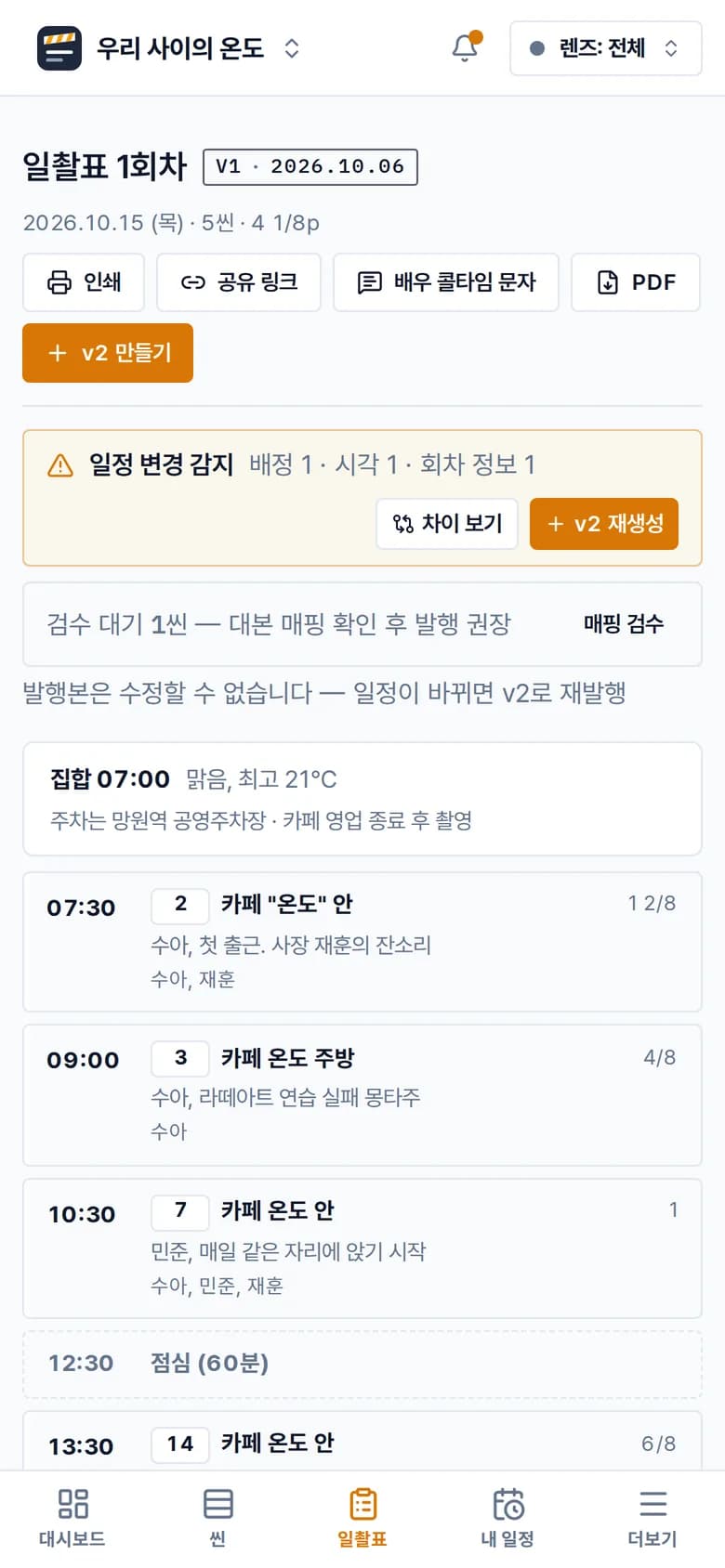
Call Sheet Day 1 v2
The Temperature Between Us · 2026.10.15 (Thu) · Published
Printed 2026.10.06 09:12 · PDNote
| Shoot date | 2026.10.15 (Thu) | Crew call | 07:00 | Est. wrap | 19:00 | Sunrise/Sunset | 06:41 / 17:52 |
|---|---|---|---|---|---|---|---|
| Weather | Clear, high 21℃ | Pages | 5 sc · 4 1/8 pp | Notes | Park at the Mangwon Station public lot · Shooting after cafe closing hours | ||
| Time | Sc | I/E·D/N | Set | Description | Cast | Pages | Remarks |
|---|---|---|---|---|---|---|---|
| 07:30 | 2 | INT/D | Cafe "Ondo" – Interior | Sua’s first day at work. Owner Jaehoon nags her | Sua, Jaehoon | 1 2/8 | |
| 09:00 | 3 | INT/D | Cafe Ondo – Kitchen | Montage of Sua failing at latte art practice★ Kitchen shoot. Latte art practice scene needs to show the passage of time | Sua | 4/8 | |
| 10:30 | 7 | INT/D | Cafe Ondo – Interior | Minjun starts sitting in the same seat every day | Sua, Minjun, Jaehoon | 1 | |
| 12:30 | ─ Lunch (60 min) ─ | ||||||
| 13:30 | 14 | INT/D | Cafe Ondo – Interior | Jaehoon puts Sua in charge of a new menu item | Sua, Jaehoon, Jieun | 6/8 | |
| 15:30 | 18 | INT/D | Cafe Ondo – Interior | Sua notices Minjun’s empty seat | Sua, Jieun | 5/8 | |
| Character | Actor | Contact | Call | Scenes | Remarks |
|---|---|---|---|---|---|
| Sua | Kim Ha-neul | 06:30 | S2 S3 S7 S14 S18 | Makeup first | |
| Jaehoon | Oh Han-gyeol | 09:30 | S2 S7 S14 | ||
| Minjun | Park Do-yoon | 08:30 | S7 | ||
| Jieun | Lee Yu-mi | 13:00 | S14 S18 |
| Set | Sc | Location / address | Contact |
|---|---|---|---|
| Cafe Ondo | S2 S3 S7 S14 S18 | Brick Cafe, Mangwon-dong34 Mangwon-ro, Mapo-gu, Seoul |
| Art & Props | Résumé envelope(S2) · Cafe Ondo sign (old)(S2) |
|---|---|
| Costume | Sua: Sua’s part-time apron(S2) |
The directing team ends up retyping the breakdown in Excel,
costume and location sheets live in separate files,
and every revised draft means printing everything again.
In PDNote, you fix the scene once. The other documents follow.
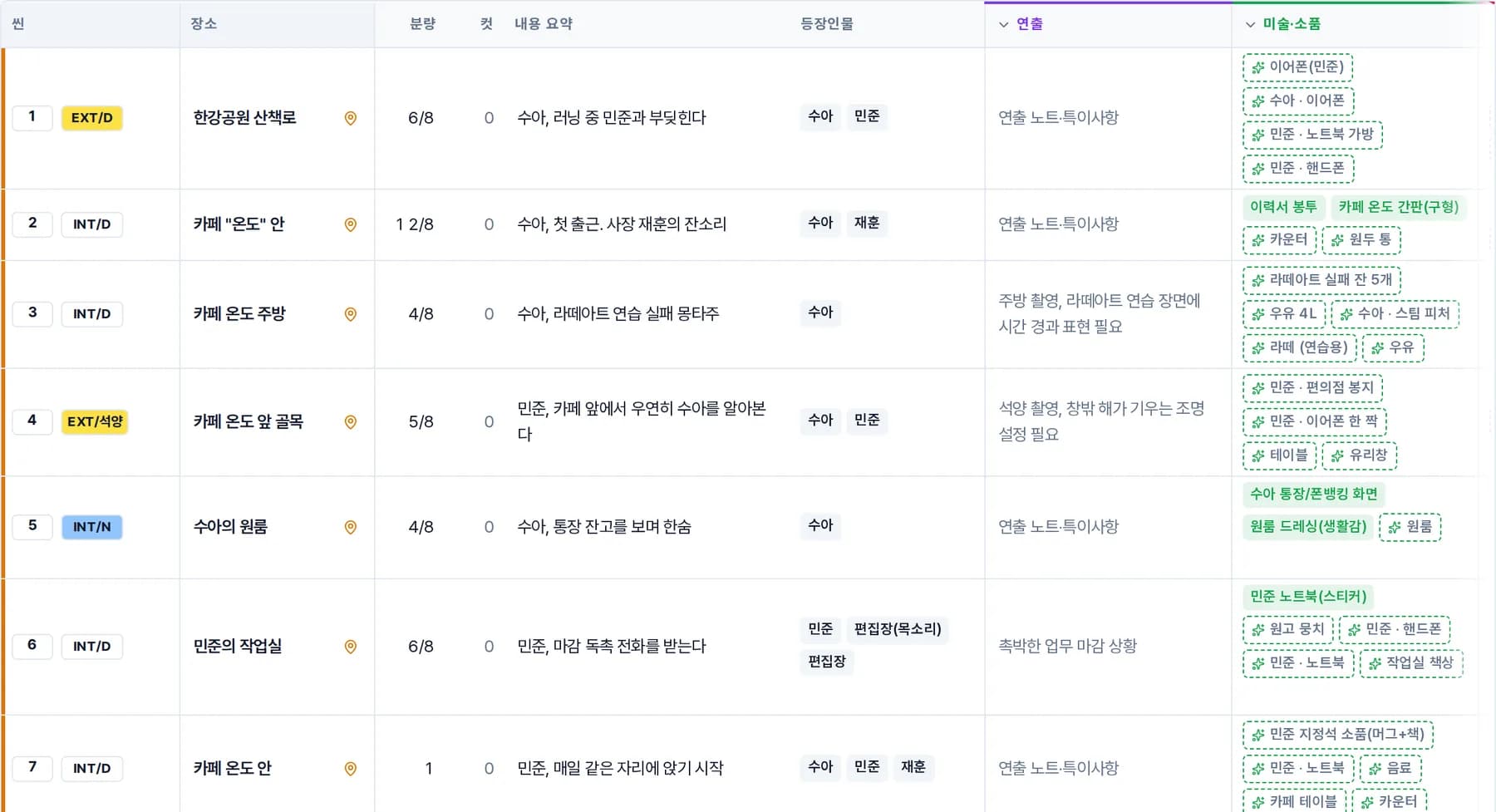
Each scene row carries its location, cast, props, costumes and page count.
The breakdown, department sheets, schedule and call sheet are different cuts of that row.
Scene rows are never deleted. They are marked as omitted, because department data and the schedule depend on them.
In the order a production moves
“The writer only sends Hangul files, so splitting scenes takes us a whole day.”
Final Draft, Fountain, plain text, PDF, Hangul (HWP) and Word files, or pasted text.
AI only finds scene boundaries and elements. The script text is cut from the original as is.
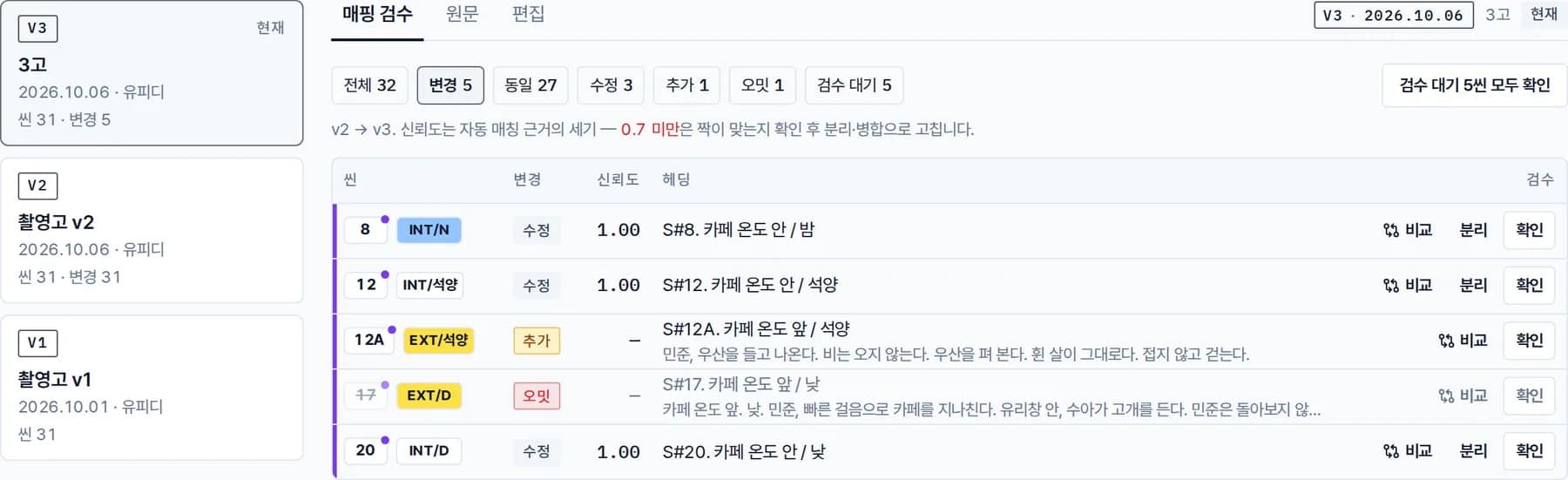
Each version keeps a table of which scenes were unchanged, modified, added or omitted.
“We always end up retyping the breakdown in Excel.”
Extracted elements arrive as pending review. Only what a department confirms in its queue goes into published documents.
The scene board is the script breakdown. Use a department lens to see only your columns, and print it on landscape A4 as is.
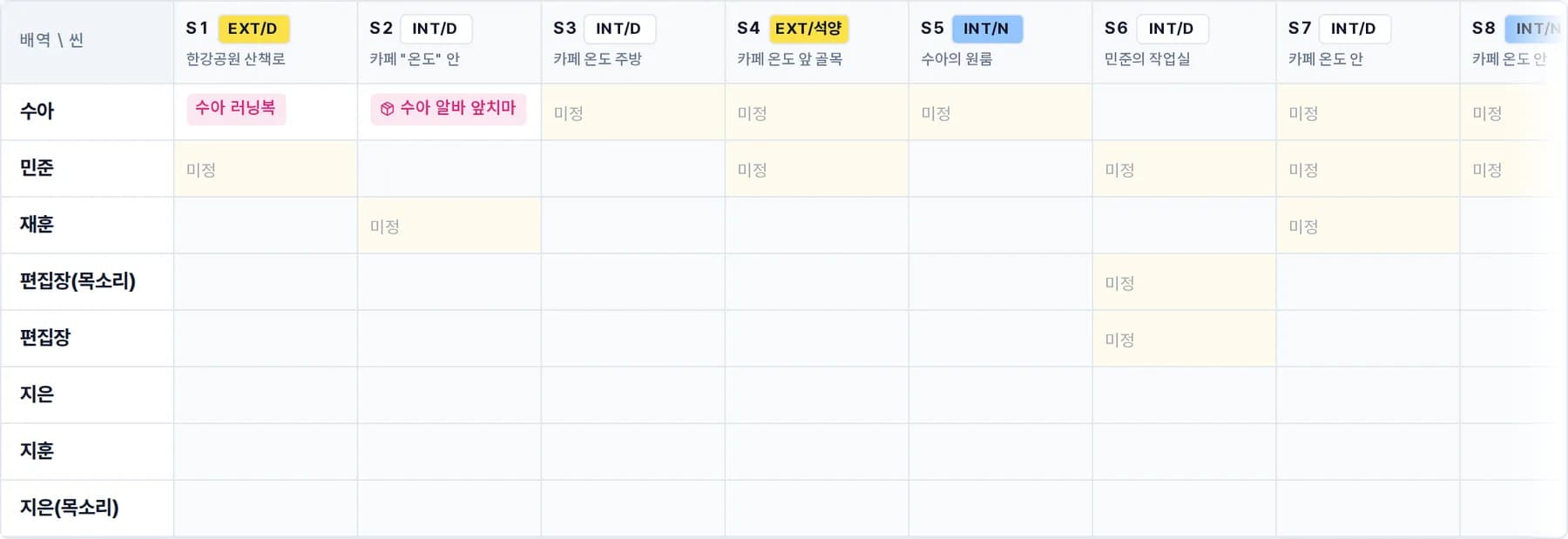
“Every sheet is a different file. I never know which one is current.”
The cast list and appearance matrix, location candidate comparison and scouting photos, art and prop sheets, costume and hair & makeup matrix — all are pivots of the scene data.
Change it in one place and the other sheets update too.
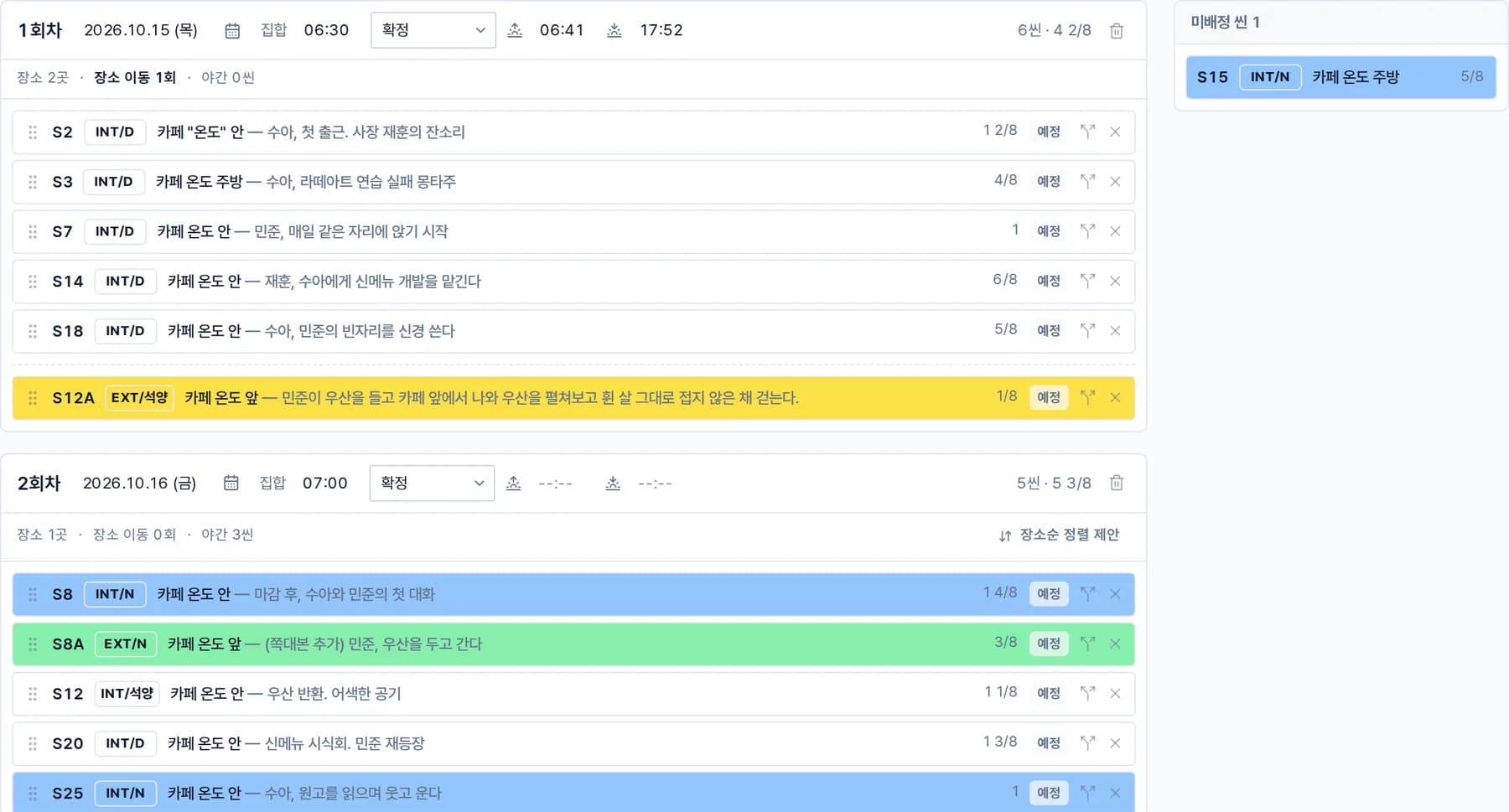
“I stay up all night counting the scenes we have left.”
INT/D white, EXT/D yellow, INT/N blue, EXT/N green. Nothing new to learn.
Drag to assign, split long scenes across days, and remaining scenes are counted for you.
“There are three call sheets in the group chat. Which one is current?”
Call sheets are published as snapshots, so a published version never changes.
Share links work without login and can expire. Export as a server-rendered PDF or ink-saving print.
On set, the timeline is on your phone.
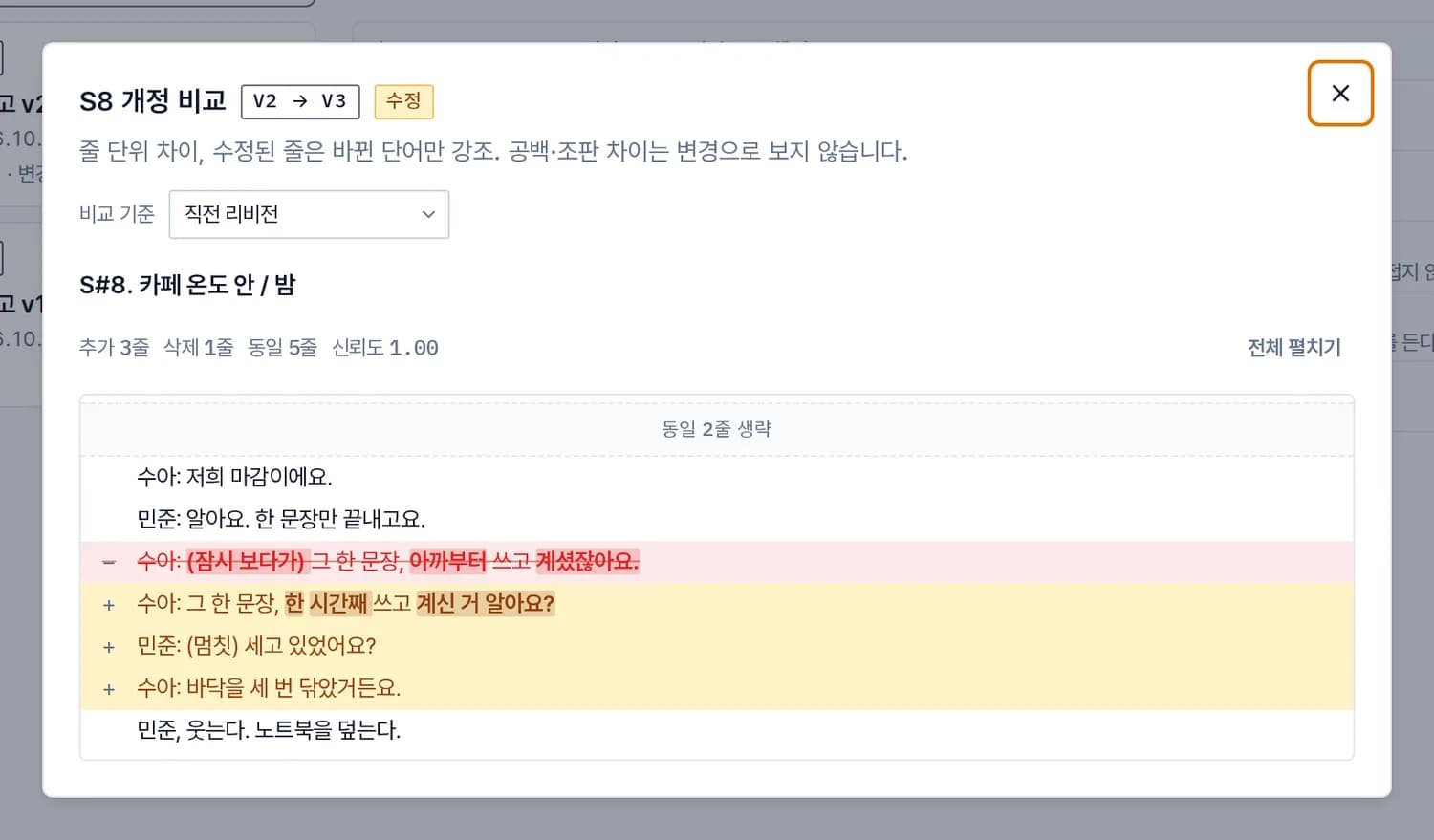
“The 3rd draft is out. How many scenes changed?”
Re-import a revised draft (2nd draft, 3rd draft — the second and third rewrites of the script) and scenes are matched as unchanged, modified, added, omitted or restored, then compared line by line.
Only departments tied to the changed scenes are notified.
“The schedule changed, so we have to redo the call sheet again.”
If a shoot day changes after publishing, a change banner appears on the detail screen. The published version stays as is while you create the next one.
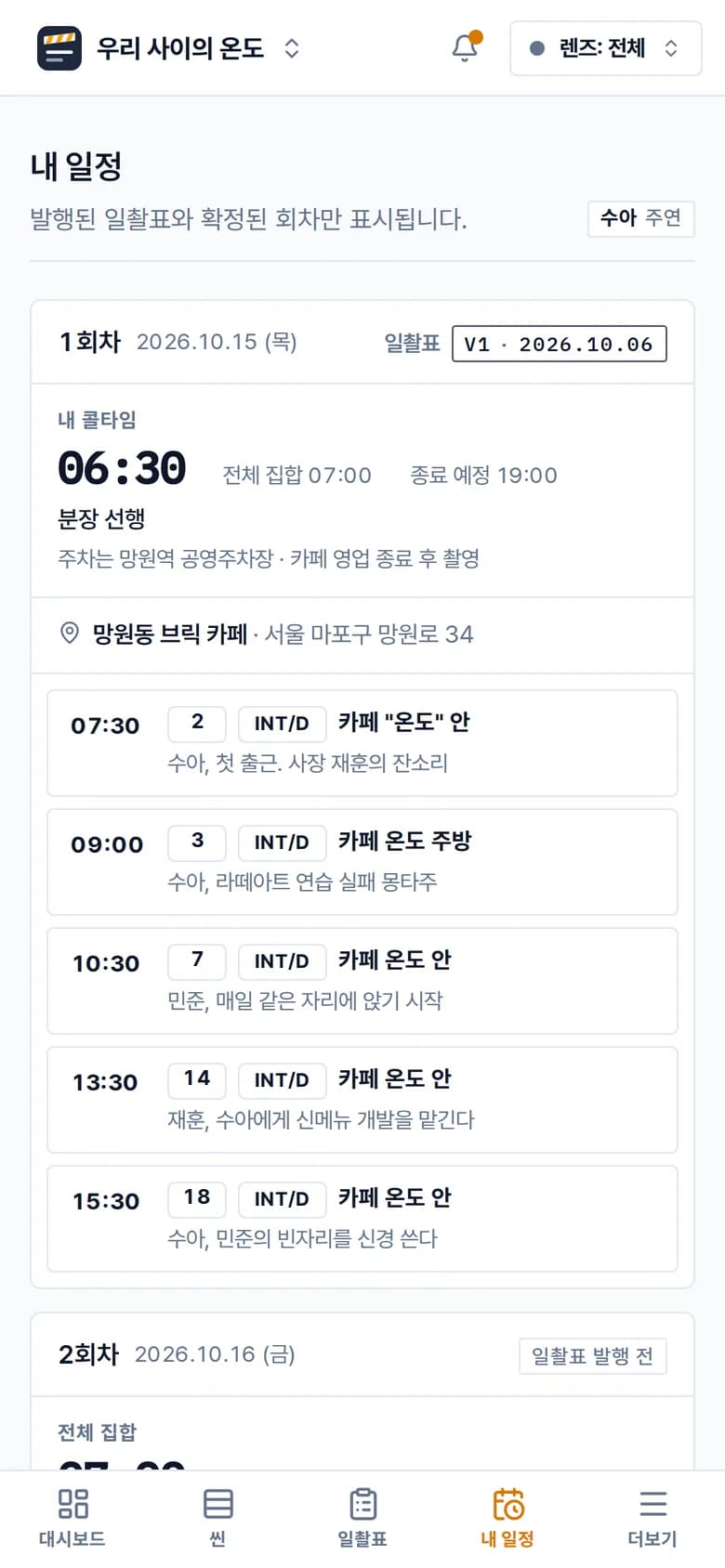
Actors see only their own shoot days and call times in My schedule.

Verified on 13 real scripts in Hangul, PDF, FDX and Fountain. Even in PDFs it catches nearly every scene boundary.
PDF scene detection precision 1.00 · recall 0.94
A 245-scene feature screenplay is broken down in one pass. A 30-scene short takes 1 to 2 minutes.
Take Off 118 scenes · Gone Girl 245 scenes
AI costs for scene breakdown and element extraction are not billed separately. Use them within the monthly count per project.
Free 3 per project per month · Pro 30 per month
Published call sheets are rendered to PDF on the server and downloaded straight from the share link. The print screen is the A4 page.
One A4 page in 1.9 s
No. The AI only finds scene boundaries and elements (locations, cast, props, costumes). The script text is cut from the original and stored as is. Extracted elements arrive as pending review and appear in documents only after a department confirms them.
Yes. A published call sheet can be opened through a share link with an expiry (7, 30 or 90 days, or never), and viewing and PDF download work without logging in. Links can be reissued or revoked.
Free costs ₩0 for 5 editor seats, 1 active project, unlimited viewers and 3 AI imports per project per month. Pro is ₩9,900 per editor seat per month (VAT included), with no limit on projects and 30 AI imports per project per month. Register a card once and you are billed automatically each month. All features are free during the beta, and we will notify you 30 days before limits apply.
Create a project, add a script, and your first breakdown is ready.
Bring in your team with an invite link for each department.